Data solutions for AEC firms
Your firm's files are probably the most valuable thing it owns, and many of them are big: Revit models, CAD drawings with linked references, scans and PDFs, alongside the contracts, spreadsheets, accounting records and email attachments everyone else in the firm works with. Where those files live, and how people in different offices open, edit and share them, shapes how smoothly your projects and your business run.
There's no single right way to manage a firm's data, and Advance2000 can build whatever your firm needs, around the tools and storage you already use. This page compares the most prominent data solutions in AEC: Panzura, Egnyte, Nasuni and Privata, which Advance2000 built itself. They are not interchangeable, and most firms pick one. Which one fits depends on how many offices you have, which applications your people use, how you work with outside consultants, and how much of your data you want to keep in a private environment.
I'm an Authorized Agent of Advance2000. Advance2000 built Privata, so keep that in mind as you read, and I've tried to be fair to each of them. I focus on high-performance virtual desktops, but I'm also involved on the data side: I helped build Advance2000's MSP relationship with Panzura, and Advance2000 now hosts the object storage behind Panzura in its own data center. My job is to help you find the setup that fits, even if it isn't one of these or isn't the one you expected.
How these fit with the Advance2000 private cloud
- Panzura, Egnyte and Nasuni all connect to your firm's domain, so people sign in and get permissions the same way they do today.
- Advance2000 can host the object storage for all three in its own data center, instead of a public cloud.
- Privata runs in the same Advance2000 private cloud as the virtual desktops.
- Office devices and network planning. Advance2000 can deploy and support the on-site devices (Panzura nodes, Egnyte Smart Cache) and plan the network, and has done so for customers. Some firms prefer to run these themselves, and that works too.
- Support depends on your plan. Advance2000 offers different support plans, and most firms choose Silver support and manage their own applications.
Panzura
What it is
Panzura CloudFS is a global file system. In Panzura's description, one authoritative copy of your data sits in object storage, and each office has a CloudFS node that caches the files that office is working on, so opening and saving feels like using a local file server. Panzura's file locking is coordinated across all offices, and it supports byte-range locking in applications that use it, which Panzura says includes Revit and AutoCAD, so several people can work in different parts of the same large file. Panzura also publishes AEC reference architectures and says firms such as TLC Engineering and McMillan Pazdan Smith use it. Advance2000 can host the object storage behind Panzura in its own data center.
Pros
- Real-time file locking across offices. Panzura says a lock taken in one office is visible in every other office right away, so teams don't overwrite each other.
- Designed for multi-office Revit work. Panzura says it lets Revit's own worksharing and byte-range locking work across sites. Panzura also publishes a case study in which a customer reports Revit models opening in seconds instead of 25+ minutes. That is the customer's reported result, and your results will depend on your network and models.
- Works like a file server. Panzura says users reach files through standard SMB, with no special client software required for the AEC applications it lists.
- Local caching at each office. The files an office uses most stay close to the people using them.
- Built-in protection. Panzura describes immutable (write-once) storage and frequent snapshots as part of the platform, which it positions as ransomware protection and a replacement for separate backup.
Cons / things to consider
- It takes planning. Panzura's own AEC white paper notes that the Revit experience depends on network design, bandwidth and latency between sites, the number of simultaneous users, and how the Revit model is organized into worksets. It also recommends a DFS namespace so Revit sees the same server path from every office.
- Each office needs a node. Advance2000 can deploy and support the nodes, or your team can.
- Outside sharing is a separate piece. Panzura's core product is a file system for your own staff. Sharing with outside consultants and clients runs through a Panzura edge server, rather than a sharing service built into the platform the way it is in Egnyte or Privata.
- Built for more than one office. Panzura offers a separate single-site option (Panzura Express), but multi-office collaboration is where its design shines.
Often a good fit when
- You have two or more offices that need to work in the same Revit or CAD projects at the same time.
- File open and save times over the WAN are a daily complaint.
- You want one authoritative copy of your data with strong protection against ransomware and accidental overwrites.
- You want the network and namespace planned properly. Advance2000 can do that planning, or your IT team can.
Egnyte
What it is
Egnyte is a cloud content platform for sharing, governing and collaborating on business files. Egnyte describes its AEC offering as a way to work on BIM, CAD and design files from anywhere, using familiar drive-letter paths in the desktop app. Its Adaptive Block Caching feature works with file blocks instead of whole files, and Egnyte says this keeps linked references (such as XREFs) intact. For offices that want local speed, Egnyte also offers Smart Cache, an on-site device that caches files and supports SMB access, global file locking and cloud-based management.
Pros
- Built with AEC files in mind. Egnyte publishes AEC-specific features for large CAD and BIM files, and says it works with Revit, AutoCAD, Civil 3D and MicroStation.
- Linked files stay intact. Egnyte says its block-level caching keeps external references and linked assets working, which is a common pain point with cloud storage.
- Integrations. Egnyte lists integrations with Autodesk, Procore and Bluebeam.
- Built-in sharing and governance. Egnyte has its own service for sharing with outside parties, and lists role-based permissions, audit trails, ransomware detection and compliance support (including CMMC) on its AEC page. Which features you get depends on the plan.
- Mature product with a large customer base. Egnyte states 23,000+ customers in 112 countries.
- Optional on-site speed. Smart Cache gives an office a local copy of frequently used files with SMB access.
Cons / things to consider
- Revit worksharing across offices. Egnyte's own help documentation says Revit Worksharing on Smart Cache supports single-site environments only, and is not recommended for users on VPN or in different office locations. If several offices need to work in the same central Revit model at the same time, test this first.
- On-site devices to manage. Local speed in each office means a Smart Cache device in that office. Advance2000 can deploy and support these, or your team can.
- Features vary by plan. Some capabilities Egnyte lists (for example advanced ransomware recovery and AI features) are tied to higher plans, so what you see in a brochure may not be what is in your plan.
- A shared cloud platform. Egnyte is built for many customers, not just your firm. If you'd rather keep the object storage in a private data center, Advance2000 can host it.
Often a good fit when
- Your team shares drawings and models mostly in a single main office plus remote and field staff.
- You work with many outside consultants, clients and contractors and want controlled sharing links and audit trails.
- You rely on Procore, Bluebeam or Autodesk tools and want a platform that integrates with them.
- You want a well-established platform with a large user base.
Nasuni
What it is
Nasuni is a file data platform built on its own global file system, UniFS. Nasuni says it keeps the authoritative copy of your files in object storage, either in a private cloud or a public cloud, and caches the files each office is actively using on a Nasuni Edge Appliance, which can be a physical device or a virtual machine. People reach files through standard file shares and sign in with your existing Active Directory accounts. Advance2000 can host the object storage behind Nasuni in its own data center.
Pros
- File locking across offices. Nasuni's Global File Lock lets only one person change a file at a time, no matter which office they are in. Nasuni publishes recommended settings for Revit, AutoCAD, Civil 3D, MicroStation and Bluebeam Revu, as well as Microsoft Office.
- Revit worksharing across sites. Nasuni's Revit guide describes file-based worksharing with users in several offices working at the same time, with only model changes sent between sites.
- Protection built into the base platform. Nasuni says its file system is write-once (immutable), with unlimited snapshots as often as every minute, so you can restore a known good version after ransomware or a mistake.
- Light office hardware. Edge Appliances cache only active files, and Nasuni says they need a fraction of the storage of a full file server.
Cons / things to consider
- Network matters for Revit. Nasuni recommends at least 50 Mbps (100 Mbps preferred) for Nasuni at each office, and low latency to its lock service. It says simultaneous work on a shared model is not recommended above 150 ms of latency, and users may notice slowdowns with more than four people working in the same model at once. It also calls for a unified namespace (such as DFS) so every office sees the same path.
- Some features are add-ons. Nasuni's ransomware detection and its Access Anywhere service (remote access and sharing links for outside parties) are add-ons to the core platform.
- An appliance in each office. Each location that needs fast access needs an Edge Appliance, physical or virtual.
Often a good fit when
- You have several offices working on the same projects and want a file-server experience in each one.
- You already run Nasuni and want the object storage in a private data center instead of a public cloud.
- You want frequent, immutable snapshots as your main protection against ransomware.
Privata
What it is
Privata is Advance2000's own platform for sharing, co-editing and managing business files. Each firm gets a private tenant, deployed into its own environment in the same Advance2000 private cloud that runs the virtual desktops. Advance2000 describes it as a content cloud that "works like a local file server," where people open files from their desktop applications without downloads, duplicates or version conflicts, and without a VPN. Because it's Advance2000's own product, Advance2000 can also develop on it for a firm's specific needs. The platform includes governance features (permissions, audit trails, anomaly detection) and private AI built in that respects each user's access permissions.
Pros
- Private tenant with full data ownership. Your firm's data sits in its own environment, not on a shared public cloud platform.
- Same private cloud as your virtual desktops. If you also run virtual desktops with Advance2000, your files live right next to them.
- Built-in sharing with outside teams. Advance2000 lists secure sharing with internal and external stakeholders, view-only permissions, password-protected links and dynamic watermarking.
- Governance built in. Advance2000 lists audit trails, flexible permissions, suspicious-login response and protection against exposed document links and ransomware.
- Can be tailored. Advance2000 can develop on Privata for a firm's specific workflows.
- Private AI built in. Advance2000 describes AI search and insights that respect user permissions. Privata's AI runs in your private tenant. The others connect your files to Copilot, ChatGPT or other cloud AI. If your firm uses Microsoft 365 Copilot, Advance2000 can also build Microsoft Graph connectors so Copilot can work with your Privata files.
Cons / things to consider
- Not the tool for live multi-office Revit models. Privata does file locking, but it is a data-cache product, so it has real trade-offs when several offices work live in the same large central Revit model. Most firms that need that kind of cloud Revit collaboration use Autodesk Forma Design Collaboration (formerly BIM Collaborate Pro), and use Privata for the rest of their project and business files.
- Newer than the other three. Panzura, Egnyte and Nasuni have years of published customer stories. Privata's public track record is shorter.
- Fewer published AEC integrations. Egnyte, for example, publishes integrations with Procore, Bluebeam and Autodesk. If you rely on a specific tool, ask how it would work with Privata, since Advance2000 can develop for specific needs.
Often a good fit when
- You want your files in a private environment that you own and control.
- You already use, or are considering, the Advance2000 private cloud and want data and desktops in one place.
- You regularly share files with outside consultants and clients and want tight control over who sees what.
- You want built-in governance, are open to AI features, or have workflows that would benefit from custom development.
Side by side
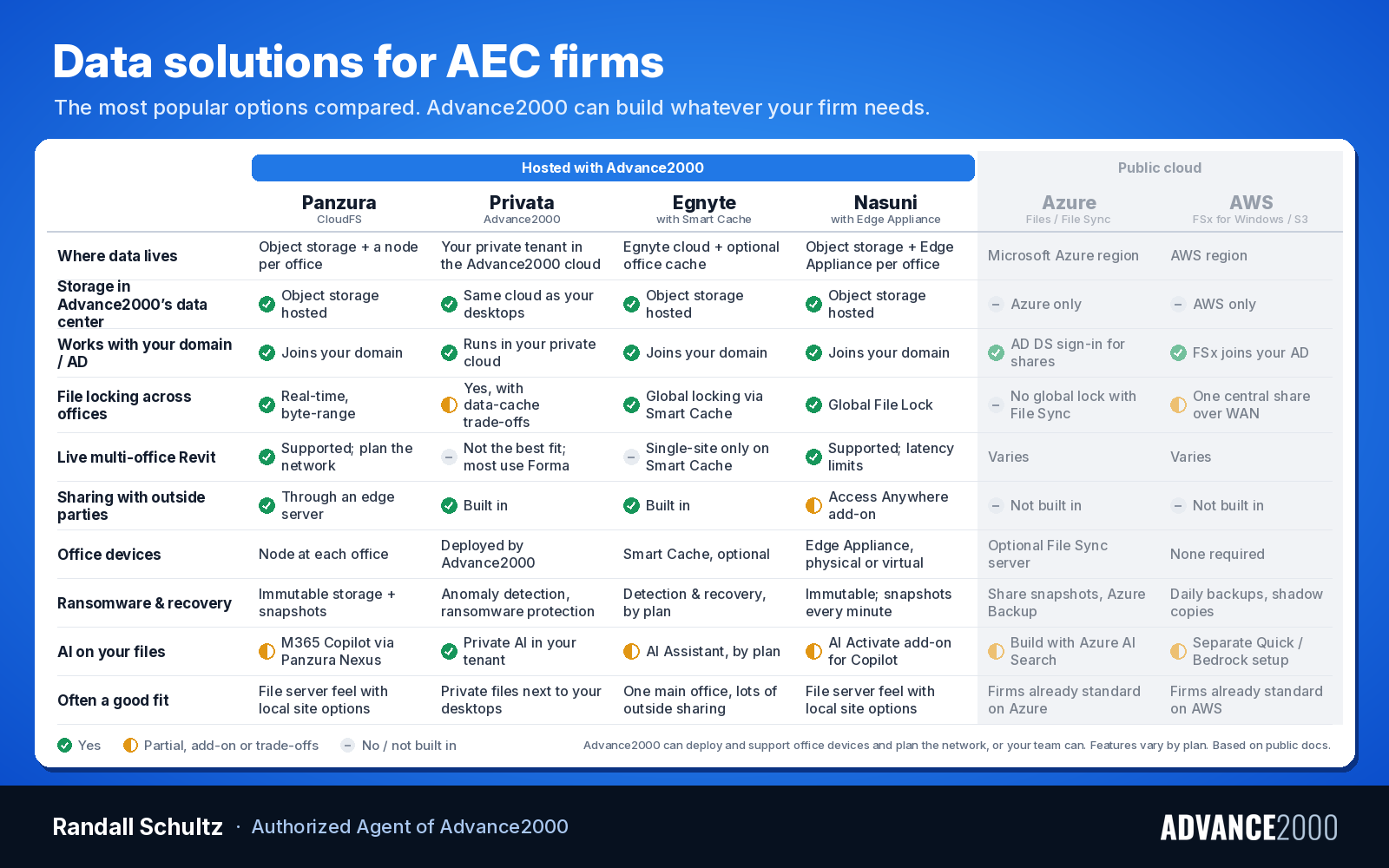
This is a starting point, not a verdict. It's based on each company's public material and Advance2000's own experience. A free demo or a pilot on a live project is the best way to see how each one performs with your files.
| Panzura | Egnyte | Nasuni | Privata | |
|---|---|---|---|---|
| Where your data lives | One authoritative copy in object storage, with a caching node at each office | Egnyte's cloud, with optional Smart Cache devices in offices | One authoritative copy in object storage, with an Edge Appliance at each office | Your own private tenant in the Advance2000 private cloud |
| Object storage in Advance2000's data center | Available | Available | Available | Already in the Advance2000 private cloud |
| File locking across offices | Real-time locking across offices, including byte-range locking | Global file locking through Smart Cache | Global File Lock across offices | File locking, with a data-cache design |
| Revit worksharing across offices | Supported; depends on network design | Single-site only on Smart Cache, per Egnyte's documentation | Supported; depends on bandwidth, latency and number of users | Not the best fit; most firms use Autodesk Forma for this |
| Sharing with outside parties | Through a Panzura edge server | Built-in sharing service | Through the Access Anywhere add-on | Built-in sharing service |
| Connects to your domain | Yes | Yes | Yes | Runs in the same private cloud as the virtual desktops |
| Office devices | Node at each office; Advance2000 or your team can run them | Smart Cache (optional); Advance2000 or your team can run them | Edge Appliance at each office, physical or virtual | Deployed by Advance2000 into your environment |
| Ransomware and recovery | Immutable storage and frequent snapshots | Detection and recovery tools, depending on plan | Immutable storage and snapshots as often as every minute; detection is an add-on | Anomaly detection and ransomware protection |
| Things to weigh | Network planning; outside sharing is separate | Cross-office Revit worksharing; features by plan | Network planning; some features are add-ons | Newer platform; not for live multi-office Revit models |
Not sure which fits?
Most firms I talk with aren't sure, and that's fine. Tell me how many offices you have, which applications your people use all day, and how you work with outside teams, and I'll tell you what I'd look at first. The best way to find out is to see it with your own files.
Randall Schultz, CaddForce LLC, Authorized Agent of Advance2000